
Real Mouse: Control Your Computer with Your Phone

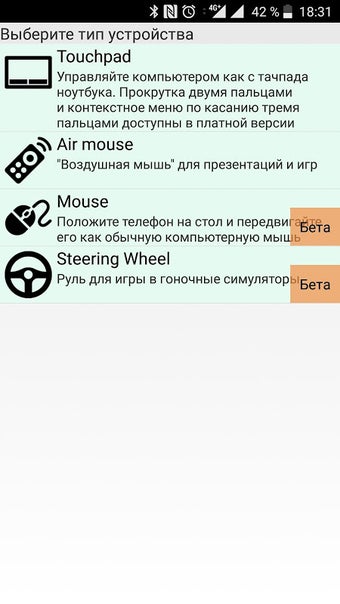
Real Mouse is a free Android app developed by SibGear that allows you to control your computer using your phone as a touchpad on laptops. The app has several features, including multi-touch gestures like vertical scrolling with two fingers and calling the context menu by touching with three fingers.

In addition to the touchpad feature, Real Mouse also offers an air mouse (presenter) function that allows you to manage presentations from your phone. You no longer need to carry a mouse around the room or ask someone to switch the slide or show an object on the screen to focus attention.

Real Mouse also has a steering wheel feature that lets you play computer car and air simulators using your mobile phone as a steering wheel. Tilt the device left/right to rotate, forward/backward to accelerate and decelerate. Finally, the app offers the world's first implementation of the familiar smartphone-based computer mouse. Simply put the phone on the table and move it like a normal mouse.

Please note that to use Real Mouse, you must have Bluetooth on your computer. Also, the manipulator is available in beta version and the functionality is being finalized. To begin using the app, you need to download the server part of the project to your computer from SibGear's website.

 0/1

App specs

  • License

    Free

  • Version

    1.1

  • Latest update

  • Platform

    Android

  • OS

    Android 13.0

  • Downloads

    61

  • Size

    2.03 MB

  • Developer

    • SibGear
  • Download Options

    APK, Google Play

  • Filename

    com-sibgear-realmouse-client-11-56095605-6476a1e5dc931990201fe8648ef4803f.apk

Program available in other languages


User reviews about Real Mouse

Have you tried Real Mouse? Be the first to leave your opinion!

Add review

You may also like

Explore Apps

Latest articles

Laws concerning the use of this software vary from country to country. We do not encourage or condone the use of this program if it is in violation of these laws.
Softonic

Is Real Mouse safe?

100/100

Score result: Clean

This file passed a comprehensive security scan using VirusTotal technology. It is safe to download.

  • Virus free
  • Spyware free
  • Malware free
  • Verified by Security Partners

    VirusTotal logo

Scan Info

Last scan
Monday, April 29, 2024
Scan provider
VirusTotal · Full report

File Integrity

File
com-sibgear-realmouse-client-11-56095605-6476a1e5dc931990201fe8648ef4803f.apk
SHA256
479cf2ba809e8777d80c9e16cf7aeb0d96dd53673c74f8324b851dbc61664168
SHA1
fdc0d1db96d7ce9a6111b7c6001a9b3d44e275df

Softonic security commitment

Real Mouse has been thoroughly scanned by our advanced security systems and verified by industry-leading partners. This file comes from the official developer and has passed all our security checks, showing no signs of viruses, malware, or spyware. For more information, visit our Security and Trust Center